The search advice a small business or nonprofit usually gets comes in two flavors. One is a monthly retainer with a dashboard bolted on. The other is a list of tricks — keyword density, meta keywords, blog three times a week — that stopped working years before most of the people repeating them started repeating them. Neither describes what actually moves a small organization up in Google, which is duller and slower than either flavor admits: you make yourself easy to understand, you give every distinct thing you do its own page, and then you wait.

What follows is the strategy we run on our own site, in the order we would run it for you. At the end we will show you the numbers it has produced — including the two places it is still going wrong.
Start by telling Google who you are
Before Google can rank you for anything, it has to decide what you are. Not which keywords you sprinkled — what kind of organization, serving whom, from where. Most small sites never say it plainly, and then wonder why they turn up for nothing.
The fix is not clever. It is writing down, in ordinary words, the things everyone inside your organization already knows:
- Say what you do, in your customer’s words. Not “integrated supporter engagement” — “we help families in Linn County find housing.” The phrase you would use on the phone is the phrase people type.
- Say where you are and who you serve. A city, a county, a region. If your service area covers six towns, name those six towns somewhere real — in sentences, not in a footer stuffed with them.
- Be consistent about your name, address, and phone number. Website, Google Business Profile, social accounts, old directory listings. Google cross-references these, and a stale suite number in three places is a small but genuine drag.
- Name your actual work. Clients, partners, programs, funders, past projects. These are the connections that let a search engine place you in a neighborhood of related organizations instead of floating alone.
- Have a real About page. Names, faces, history, credentials. It is one of the few pages that demonstrates — to a search engine and to a human reading it the same afternoon — that there are actual people here.
None of this is a trick, and that is rather the point. Google is not trying to be fooled. It is trying to work out what you are, and most small sites simply never tell it.
Give every distinct thing its own page
This is the highest-leverage move available to a small organization, and it costs nothing but writing.
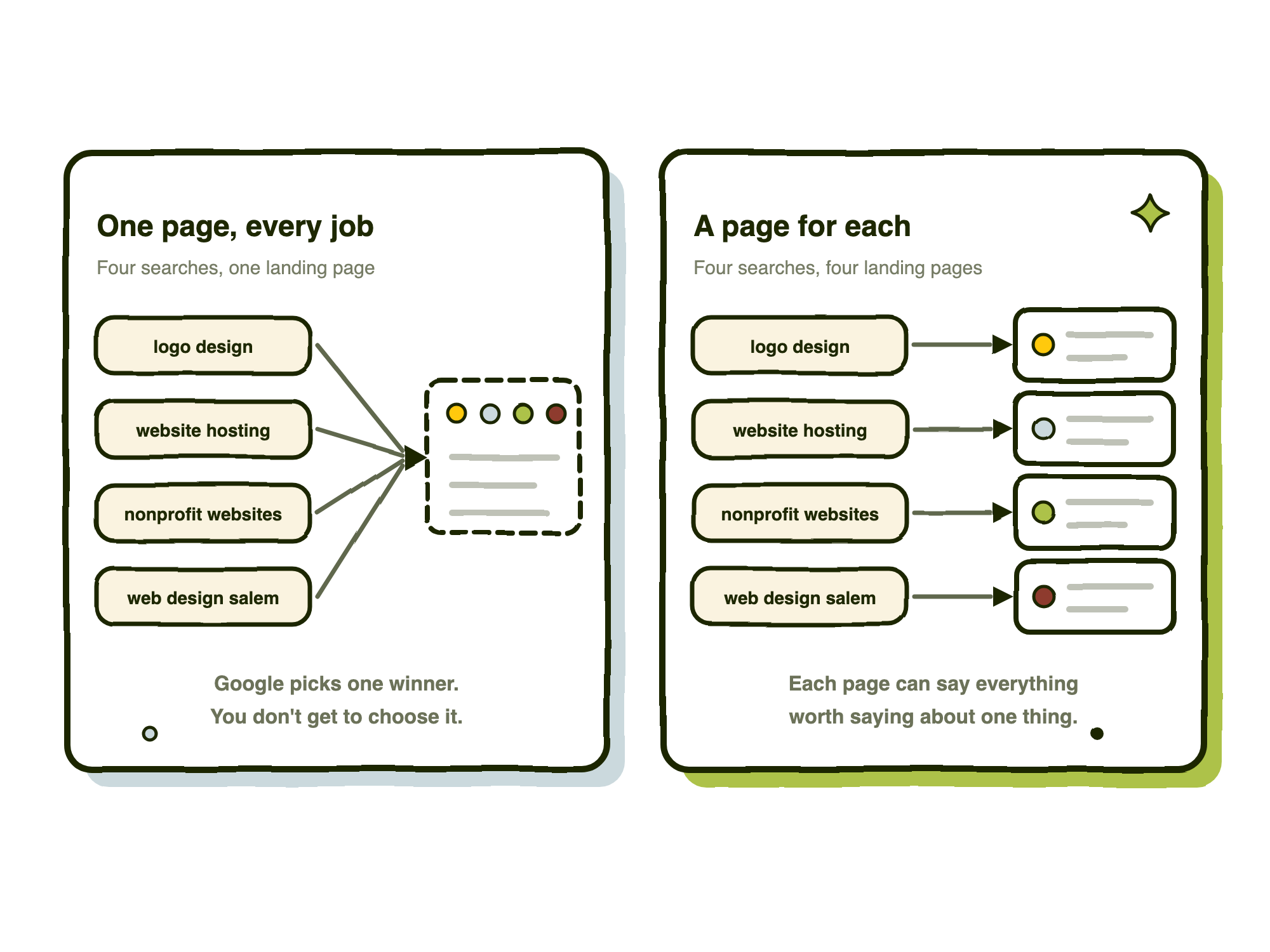
A page can only be about one thing well. If your services page lists eight services at a paragraph each, you have one page competing for eight different searches, and it will do a mediocre job of all of them. Split them, and each one gets a page that can say everything worth saying.
What deserves its own page:
- Each service you would quote separately. If someone could buy it on its own, it is a page.
- Each place you actually work. A page per city or county — but only where you have something real to say: local clients, local projects, local knowledge. A page with the city name swapped in and nothing else is worse than no page at all.
- Each product line or program. Nonprofits especially: one page per program, not a single “What We Do.” Each program has its own donors, its own searchers, and its own vocabulary.
- Each substantial question. That is what a blog is for — the questions that deserve eight hundred words rather than a line in an FAQ. Ours so far: what a website costs in Oregon, what hosting and maintenance actually include, and whether you need a professional logo.
Then do the unglamorous bookkeeping. Write down every page and the one phrase it should own. One phrase, one page. If two pages are chasing the same phrase, you have built a competition between your own pages — and Google will pick a winner you did not choose.
What it looks like when the wrong page wins
We have this problem on our own site, and it is the clearest example we can give you.
We built a McMinnville page to rank for people in McMinnville looking for a web designer. We also have a case study about the website we built for McMinnville School District. Google prefers the case study. Today the phrase “mcminnville website design” sits at position 5 — via the case study, not via the page we built for the term.
That is not a disaster. Position 5 is position 5. But it is the wrong door. The case study is a portfolio piece, written for somebody evaluating our work on school district sites. The city page is written for somebody in McMinnville who needs a website and wants to know we are an hour down the road. Same search, very different landing.
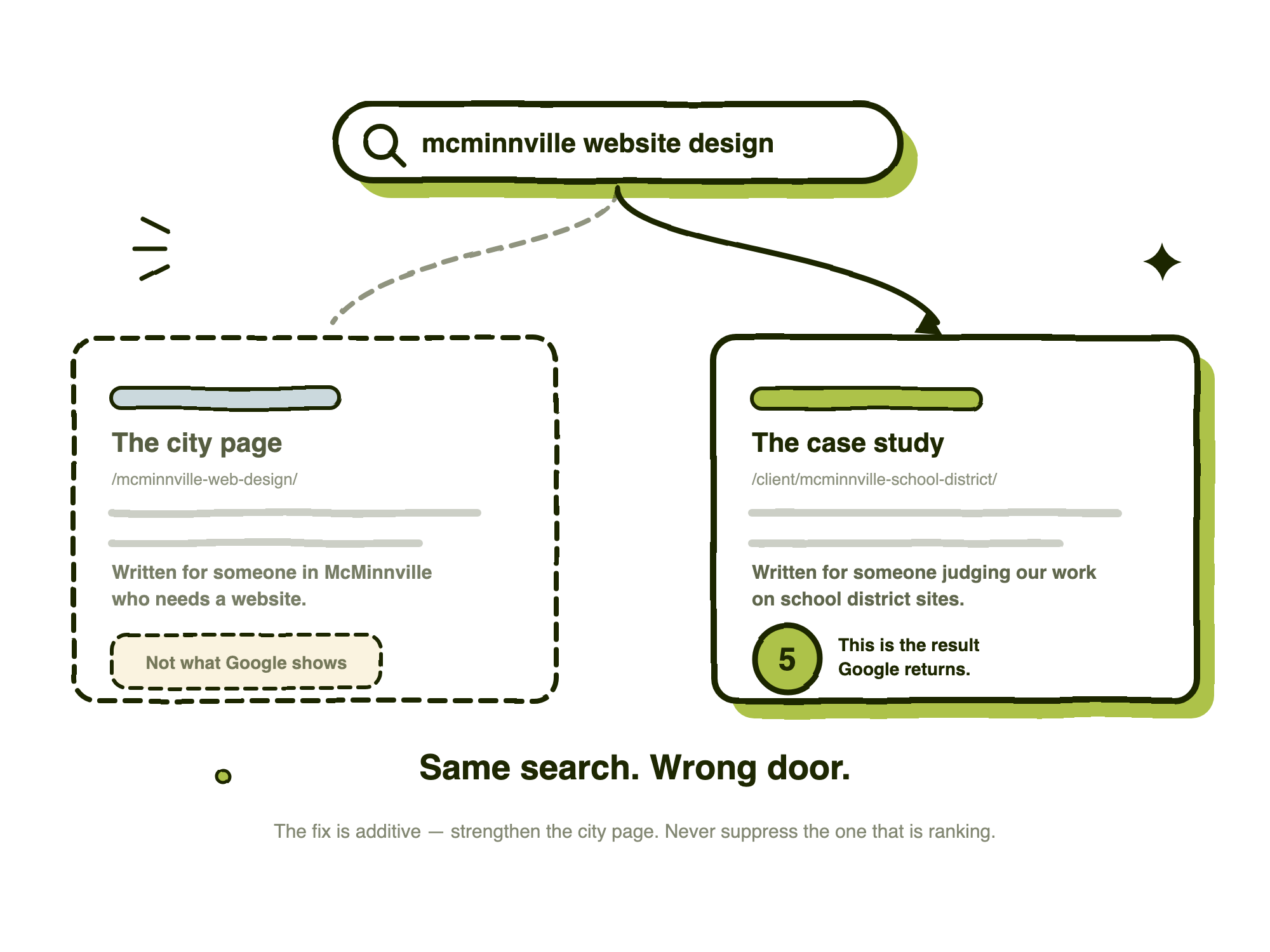
Why it happens is easy enough to guess: the case study is older, it names McMinnville repeatedly inside a real story, and it has been linked to for longer. Google decided it was the better answer, and it was not obviously wrong.
What we are doing about it is the part worth copying. We have not touched the case study. Instead we added the city into the city page’s title, links to the city pages from the site footer, and a fix to the geography language on the page itself. All additive, all aimed at the page we want to win — and then we watch two snapshots before concluding anything.
Never suppress the page that is currently ranking before the replacement demonstrably holds the term.
The tempting move — hiding the case study to “clear the way” — is the one that loses you position 5 and gains you nothing.
Answer the questions people actually ask
An FAQ section used to be filler. It is not anymore, because of who is reading it.
ChatGPT, Google’s AI Mode, Perplexity and the rest answer in prose and cite their sources. What they reward, when they assemble an answer, is content already shaped like one: a clear question followed immediately by a direct response. An FAQ block is the cheapest way in the world to produce that shape, and most small sites still do not have one.
- Use real questions. The ones in your inbox and on your calls, not the ones you wish people asked. If you are stuck, read your last twenty inquiry emails and write the questions down verbatim.
- Answer in the first sentence. Then elaborate. A machine assembling a summary takes the opening line; so does a human skimming.
- One question, one answer. Do not bundle three questions into a paragraph and hope.
- Include what you do not do. “Do you offer X?” answered with “No, and here is who does” is among the most quotable things you can publish, and it spares you the wrong inquiries.
- Put them on the relevant page, not on one central FAQ page. Pricing questions belong on the pricing page, where the person asking them already is.
Our own SEO page carries a question asking whether we guarantee specific rankings. The answer begins with “No.” That is the kind of answer that gets quoted, and it also happens to be true.
An honest caveat: we cannot prove to you that any of this has produced a citation, and nobody selling it to you can either. Referral traffic from AI assistants is poorly attributed and the systems change monthly. We do it because the content is better for humans either way — which is the only good reason to do anything on this list.
Advanced: mark your facts up in schema
Skip this section if you are doing the earlier ones badly. It is the least important thing on this list and the one people are most excited about.
Schema markup is a block of structured data in your page’s code that states, in a vocabulary Google and the AI models already parse, the facts a human reads from the design. Your name. Your address. Your hours. Your service area. That this thing is a service and that is its price. That this paragraph is a review, and this is who said it.
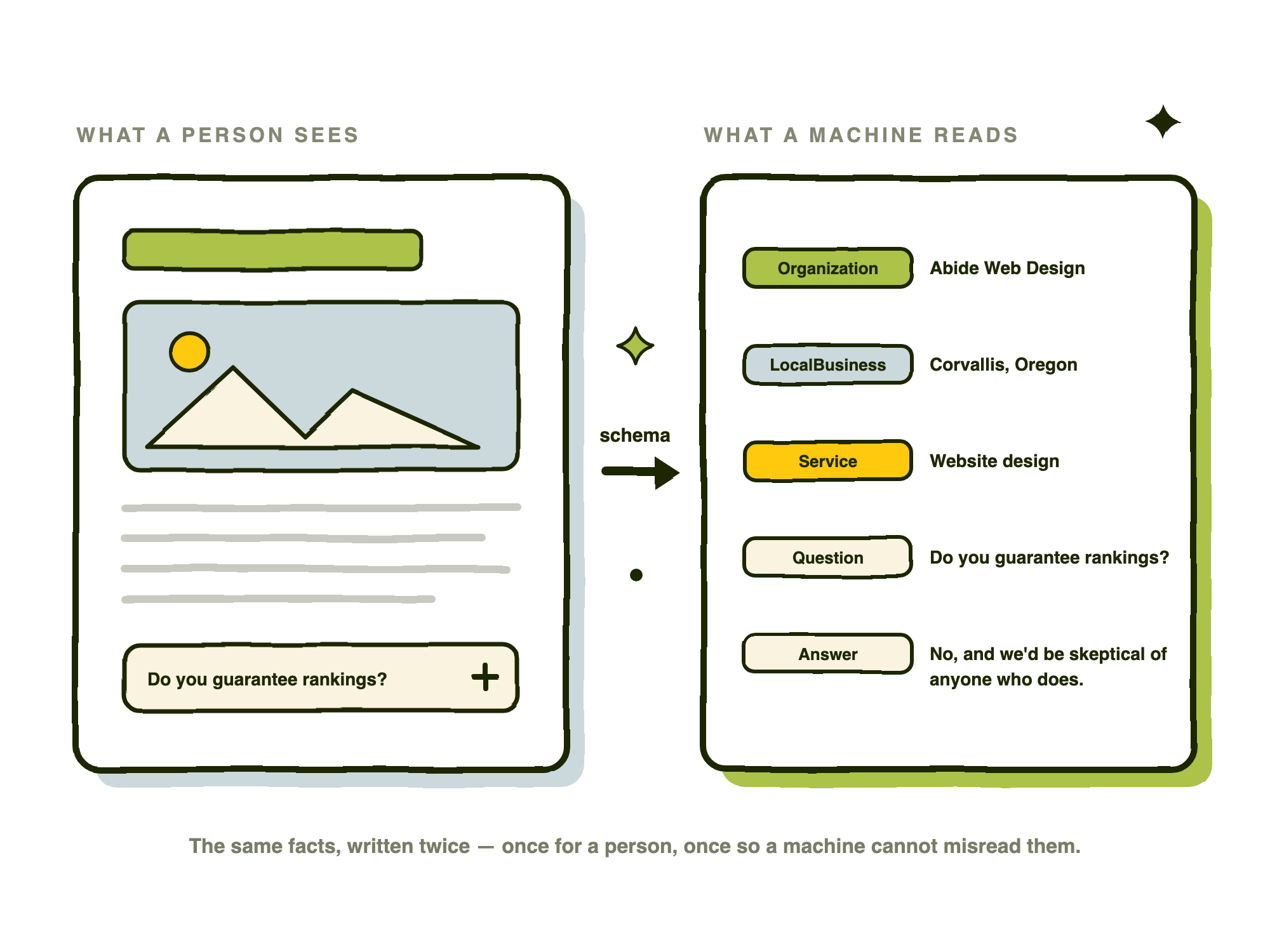
For a small business or nonprofit, the types worth having are unexciting:
- Organization or LocalBusiness — and NGO if you are a nonprofit. Name, address, phone, hours, service area, social profiles.
- Service — one per service page, describing what it is and who it is for.
- FAQPage — generated from the FAQs you just wrote, so they can be read as question-and-answer pairs rather than decoration.
- BreadcrumbList — so a search result shows where the page sits in your site.
- Review and AggregateRating — only if you genuinely display reviews on that page.
Two rules matter more than the list. First, schema must describe what is actually visible on the page; marking up reviews you do not display is against Google’s guidelines and can get your structured data ignored across the whole site. Second, schema does not make you rank. It makes you legible, and eligible for rich results and citations. Anyone selling it as a ranking factor is overstating what it does.
Most sites can get the basics from an SEO plugin without writing anything — Yoast and Rank Math both emit a reasonable organization and breadcrumb graph on their own. The hand-built layer is where the specific work lives. Our homepage currently publishes Organization, Service, Offer, Question and Answer, Person, City, AdministrativeArea, Review and Rating, all generated from the page’s real content and none of it maintained by hand.
The unglamorous half: images, speed, and access
Alt text on images
Every meaningful image gets a short description of what it shows. Decorative images — background textures, spacers, flourishes — get an empty alt attribute so a screen reader skips them instead of reading noise aloud.
Alt text is what Google reads instead of the picture. It is also what a blind visitor hears. Both are served by the same thing: an accurate sentence. “Two staff members packing food boxes at the Corvallis warehouse” is useful. “corvallis nonprofit website design food bank oregon” is keyword stuffing, and it is worse than leaving the field blank. Give the files real names while you are at it — warehouse-packing-day.jpg beats IMG_4417.jpg.
Page speed
Core Web Vitals — Google’s measures of loading, responsiveness and layout stability — are a real ranking input, and a small one. They matter considerably more for conversion than for position, because people leave slow sites.
For a small site the wins are boring and large. Resize and compress images before you upload them; this is the single biggest one, most of the time. Use a host that is not the cheapest tier of a shared plan — what you are actually buying there is worth understanding. Turn on caching. Cut the plugins and third-party scripts you are not using. Do not autoplay video. Do not load six weights of a webfont when you use two.
Honest framing: speed rarely moves you from page three to page one. It settles ties, and it stops you losing the visitors you already earned.
Accessibility, honestly
You will see accessibility sold as an SEO tactic. It mostly is not one, and it is worth being precise about why.
Accessibility is not a direct Google ranking factor, and Google has been consistent about saying so. A site can be an accessibility disaster and rank first.
But a large slice of doing it properly overlaps exactly with what a crawler needs in order to understand a page:
- A real heading hierarchy. One h1, then h2s, then h3s. It is how a screen reader navigates a page and how a search engine reads its structure.
- Descriptive link text. “Read our 2026 annual report” tells a screen reader and a search engine what is on the other end. “Click here” tells neither.
- Alt text, as above. One field, doing both jobs.
- Semantic markup and labeled form fields, so a page’s meaning survives without its visual design.
- Text kept as text, not baked into an image where nothing can read it.
An equally large slice has no search effect whatever: color contrast, visible focus rings, keyboard traps, reduced-motion preferences. Do those anyway. A meaningful share of your audience needs them — and if you are a nonprofit, a school district, a housing authority, or anyone touching public money, accessibility is frequently a legal obligation rather than a courtesy.
So build it accessible because people need it. Take the search overlap as a bonus, not as the reason.
The part nobody wants to hear: this takes months
Here is the honest timeline, and it is the same one we publish on our own SEO page. For a new site with sound foundations, improvements start showing up around four to eight weeks after launch as Google recrawls and reassesses. Meaningful gains on competitive queries take three to six months. Some take longer. We do not promise particular positions in particular timeframes, because nobody honestly can.
Two things follow from that, and both are really about temperament.
Rankings wobble, and the wobble usually means nothing. One example from our own data: the phrase “small business website design oregon” was at position 1 a week ago. Today it is at 12. We changed nothing. Another: “woocommerce website design near me” in Salem went 1, then 27, then back to 1 inside a single month. Had we reacted to either move, we would have “fixed” a page that was working.
The rule we follow is that one week’s swing on a single landing page is noise. Act when a move persists across two snapshots, or when several unrelated pages move the same way at once.
And the gains compound quietly. “non profit website design near me” in Corvallis started at position 49. It is now 1. That did not happen in a week, and no single change did it — a rebuilt nonprofit page, then internal links, then real client stories, then months of nothing appearing to happen.
The reverse is also true: some things go backwards and stay there. We had “oregon web hosting” sitting between 17 and 20 for months, and then it fell off the map entirely. When we finally looked properly, the exact phrase appeared zero times on the entire website. It had been ranking on vague relevance, and eventually Google stopped extending the courtesy. We rebuilt the hosting page around the phrase in late August. We do not yet know whether it worked.
Watching it without spending much
You cannot manage what you do not measure, but you do not need an enterprise SEO suite either.
- Google Search Console. Free, and non-negotiable. Set it up before anything else on this list. It is the only source that tells you what you actually rank for, what people actually typed, and — crucially — which of your pages Google chose to show. That last column is what catches the wrong-page problem described above, and almost nobody looks at it.
- A rank tracker, if you want position history. We use the one bundled with ManageWP because our maintenance plans already run through it; Ahrefs, Semrush, SE Ranking and Nightwatch all do the job properly. Most small organizations do not need the hundred-dollar-a-month tier. Twenty to fifty keywords, checked monthly, is plenty.
- Or ask an AI assistant, on a schedule. Both Claude and ChatGPT can run a saved task on a recurring basis. Give it ten to twenty keywords and your city, ask it to search each one and report a table of where your domain appears and which of your pages came up, and have it run every two weeks or once a month.
Be clear about what that last option is and is not. An assistant’s search results are approximate and personalized; it is not a clean rank check from a fixed location, and the numbers should not be treated as precise. What it is genuinely good at is the qualitative half — noticing that a new competitor has appeared, or that Google has started serving the wrong page of yours.
There is one more check worth adding, and it is new. Ask the assistants the questions your customers ask. “Who does website design for nonprofits in the Willamette Valley?” Then see whether you are named at all. That is the 2026 version of checking your rankings, and there is not yet a tool that does it for you.
Whatever you use, keep a dated log of what you changed. Rankings on their own are trivia. Rankings beside a list of changes are a feedback loop.
What it has done for our own site
We track 90 keywords across Oregon — service terms, city terms, industry terms. In the August snapshot, 18 sit at position 1, 39 are in the top ten, and 28 do not rank at all.
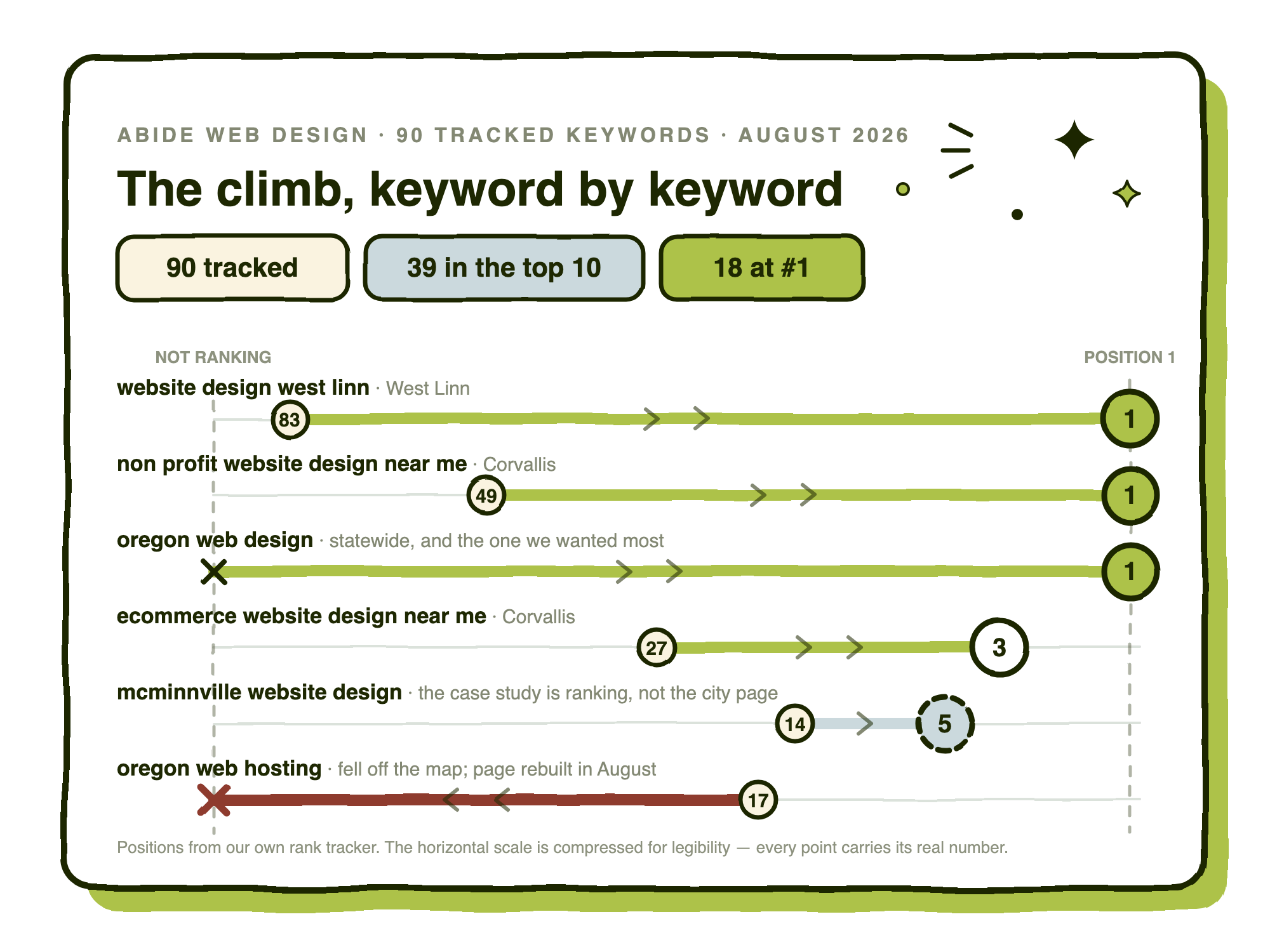
The wider spread, wins and losses together:
| Keyword | At baseline | Now | The page Google picked |
|---|---|---|---|
| non profit website design near me (Corvallis) | 49 | 1 | Our nonprofit industry page |
| website design west linn | 83 | 1 | The West Linn page |
| website design lincoln county | Unranked | 1 | The Lincoln County page |
| oregon web design | Not tracked | 1 | Homepage |
| small business website design near me (Albany) | Unranked | 2 | The Albany page |
| ecommerce website design near me (Corvallis) | 27 | 3 | The Albany page |
| mcminnville website design | 14 | 5 | A case study — not the city page |
| small business website design oregon | Not tracked | 12 | Homepage — it was 1 a week ago |
| oregon web hosting | 17 | Unranked | — |
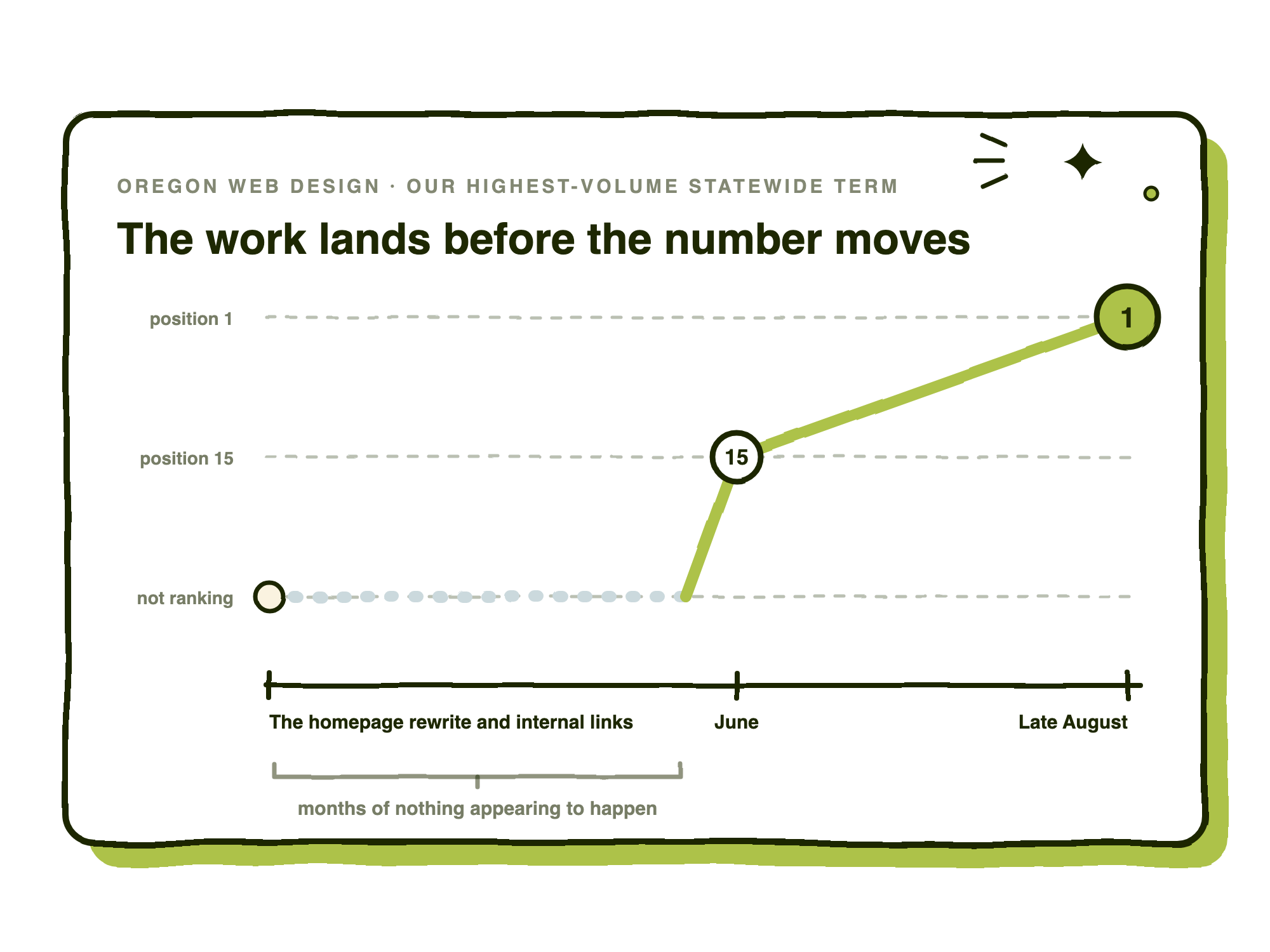
The most instructive row is “oregon web design” — the statewide query, the highest-volume term we care about, and the one charted earlier in this post. It went from not ranking at all to position 1 on the back of two changes: rewriting the homepage, then adding internal links to it from the industry and service pages.
That is the argument for the long game in a single line. The work landed months before the number moved.
The bottom two rows are the argument for honesty. Hosting fell off entirely and is mid-repair. And McMinnville is still resolving to a case study rather than to the city page built for it — which is, at least, a nice problem to have.
None of the above is proprietary, and none of it is difficult. It is a list of ordinary things, done consistently for longer than feels reasonable. If you want the technical half handled while the site is being built, that is what our SEO foundations work is — included in every custom WordPress site we ship rather than sold back to you as a retainer. If you already have a site and want to know what is wrong with it, that is an audit, and you can tell us about it here.
Either way, set up Search Console this week. It is free, it takes twenty minutes, and it will tell you something about your own site that you did not know.